Last time we explained the lack of environmental context these AI tools often face, which often leaves the project unfinished or filled with errors. That is where MCP comes in.
First things first: what is MCP?
MCP (Model Context Protocol) is a standard way for AI apps to plug into your data, tools, and workflows. It's a universal standard for connecting AI assistants to the systems where your data actually lives, instead of writing one-off integrations for each tool.
Basically, instead of wiring every model to every tool in a custom way, you plug once into MCP and speak a common language.
What the MCP structure actually looks like
At a high level, MCP is just a host, a client, and servers talking to each other using a simple message format, sent over basic connections like standard input/output or server-sent events.
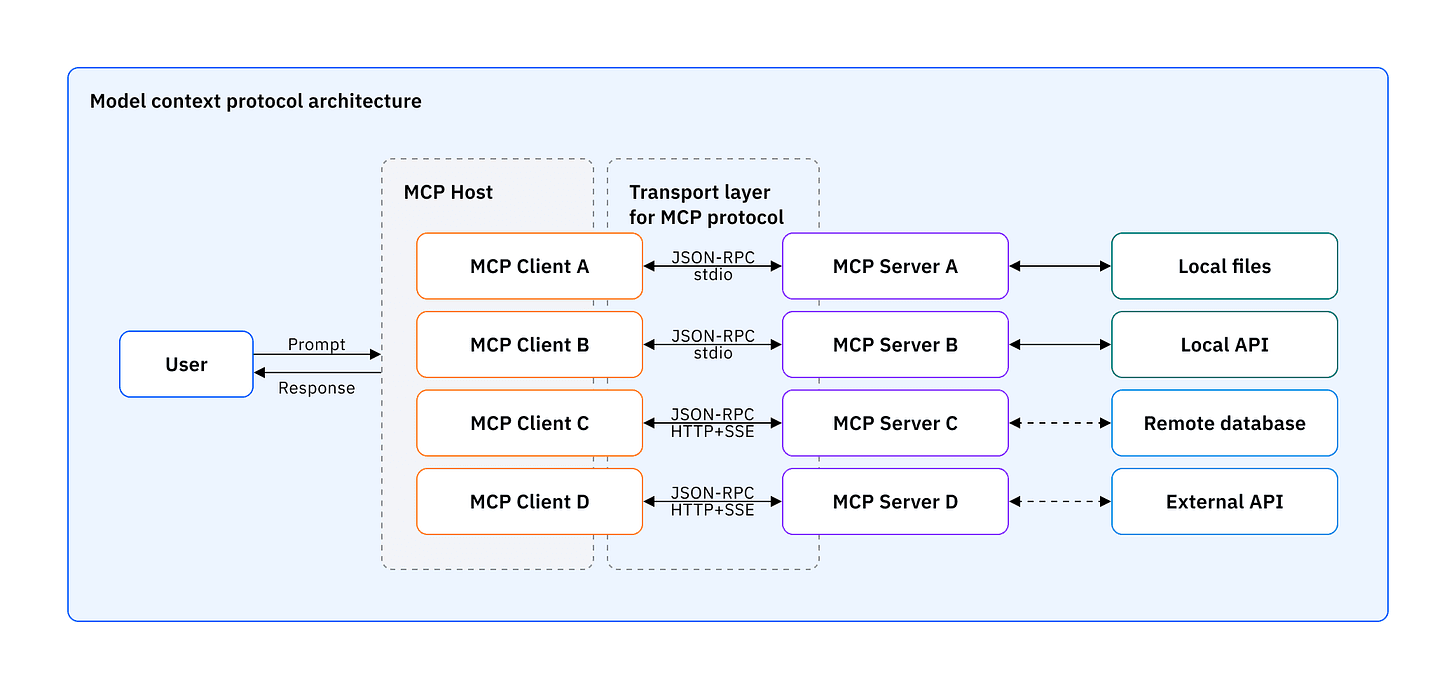
MCP Host
The AI app the user is actually using.
Examples: Claude Desktop, Cursor, your internal SAP copilot
Takes user requests and uses MCP to reach data and tools.
MCP Client
Runs inside the host and talks to the MCP servers.
- Turns model intent into structured protocol messages
- Keeps a one-to-one session with each server and handles errors, timeouts, and reconnects
- Knows which tools, resources, and prompts each server exposes
Think of the client as the session manager and traffic controller between the model and all connected servers.
MCP Server
External service that exposes context or actions in a standard way.
In SAP setups, this can wrap CAP services, Fiori, or UI5 metadata, or sit in front of ERP databases and data products.
Usually runs as a separate service or process, often shipped as a GitHub repo in TypeScript, Python, Java, or C#.
For consultants: MCP servers you already have in SAP
If you are an SAP technical consultant, you do not start from zero. SAP is rolling out MCP servers for its core dev stacks so your IDE or AI assistant can talk to them directly:
Cloud Application Programming
UI framework for enterprise apps
JavaScript UI library
Mobile Development Kit
These servers are open source under Apache 2.0 and are designed to plug into "agentic" workflows. SAP Build positions them as a way to let AI agents help you build and extend enterprise apps across different environments, not just inside one proprietary tool.
What this feels like in your day-to-day
In Cursor, VS Code, Windsurf, Copilot, Cline, or Claude Code, your MCP-enabled assistant can:
- Scaffold a CAP service
- Generate Fiori elements views
- Nudge you toward the right UI5 patterns - using SAP-maintained tools rather than guesswork
The code it generates already lines up with SAP guidelines, design patterns, and BTP best practices, instead of being "generic JS that happens to compile."
So the job for consultants is less "figure out MCP from scratch" and more:
- Know which SAP MCP servers are in your landscape
- Know which tasks they're good at (CAP CRUD, UI5 views, MDK flows)
- Know how to read the diffs and keep control of the final design
“You stay in charge of architecture and business rules. MCP just lets your AI tools plug into the SAP side cleanly instead of scraping your codebase and guessing.”
MCP for everyday tools
Even if you're not a consultant, you'll probably first meet MCP inside the tools you already use every day. There are ready-made MCP servers for apps like Notion, Canva, Microsoft Teams, Gmail, Slack, and more - either shipped by the vendors or by integration platforms.
That means your AI assistant can start to:
- Pull context from Notion pages and databases
- Create or update designs in Canva from a prompt
- Read and post messages in Microsoft Teams, or file updates into channels
Ask IT to enable your internal tools for MCP
Once people see this working in Notion or Canva, the natural next move is to ask your IT or platform team for the same thing around your internal systems: ticketing, custom SAP add-ons, data warehouse, approval workflows. MCP servers around those systems give your LLMs a standard, audited way to read the right data and propose safe actions.
Why is it worth investing in MCP internal documentation?
Treat your MCP layer like a product, not like a byproduct of experiments.
in business language
that people can trust
Why you should vouch for funding this internally:
It turns AI from one-off pilots into repeatable products - built on shared MCP servers and docs
It cuts onboarding time for new consultants and analysts, because the tools and patterns are discoverable
It separates context from model - so you can swap or upgrade LLMs without breaking how people use your tools
The Takeaway
In the end, MCP is not about another shiny AI feature. It's a way to connect your models to the real work your ERP and surrounding tools already do, in a controlled and reusable format.
Hosts, clients, and servers give you a clear structure for how assistants reach context, call actions, and stay within your governance boundaries.
For SAP teams, the new MCP servers mean your AI helpers can finally work with the same patterns, guidelines, and artifacts you use in real projects.


